
Pwning Flutter Apps
08/03/26
It is assumed that you already have a bit of knowledge about Android app pentesting.
Flutter apps work quite differently from the usual Android apps, which means pentesting them often requires a different approach.
Background on Flutter
Flutter is an open-source SDK used to write cross-platform apps in Dart. Flutter itself is built on C, C++, Dart and Skia.
Instead of using native UI components, Flutter draws every pixel on the screen using its own rendering engine. This also means Flutter uses its own HTTP client
The architecture of a typical Flutter app looks like this:
The Dart code of the app is compiled ahead-of-time as an AOT snapshot which is then run by the stripped-down Dart VM called precompiled runtime inside the Engine.
The AOT snapshot includes pre-compiled Machine code for most of the original Dart code
The AOT snapshot contains:
- Dart VM Snapshot - Shared VM heap state (objects/strings)
- Dart VM Instructions - Shared VM stubs
- Isolate Snapshot - Per-isolate heap state
- Isolate Instructions - Main AOT compiled Dart code
P.S The AOT snapshot has both the Dart code and Flutter’s framework code
The files you should be looking at are:
libapp.so     # AOT Snapshot
libflutter.so # Flutter Engine
Going forward it would be best to not use a bundled APK (.XAPK, .APKM) as they are a pain to patch and modify. If the app you are trying to pentest uses bundles, you can use AntiSplit-M to get a single merged APK.
Dynamic Analysis
This would be the easiest method and the one I would recommend you first go for.
Intercepting HTTP traffic
Most Flutter apps use the http or dio package to make HTTP requests, which means they implement SSL pinning and do not respect system proxy settings.
There are two primary ways to bypass SSL pinning:
- Using Frida with the disable-flutter-tls-verification script.
- The included patterns only work for
x86andx64builds.
- The included patterns only work for
- Patching the application using reFlutter.
- This should work across all architectures and can also print function offsets.
Once you have bypassed SSL pinning, you should proxy the traffic:
- If you are using the Android emulator, launch the emulator with the
-http-proxy http://<proxy_host>:<proxy_port>flag, or configure it directly in the emulator settings. - If not, you can just use TunProxy or any other VPN-based proxy app.
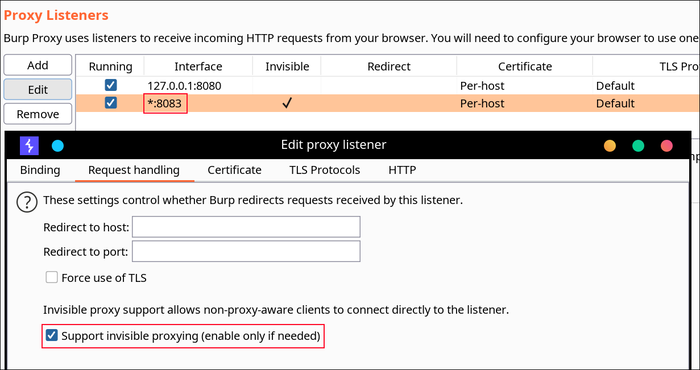
Invisible proxying is necessary, Flutter just ignores the system proxy settings.
If you are using BurpSuite, you should enable Support invisible proxying.
Static Analysis
All of the app’s logic that was written in Dart can be found in the libapp.so file.
As of writing this post, most obfuscation techniques that are available for Flutter are quite primitive (renames class and function names).
As mentioned before, libapp.so is just an ELF binary so you could just run strings on it or use Ghidra, IDA Pro, etc. to analyze it.
Another good tool for analyzing libapp.so is Blutter. As of now it only supports arm64-v8a builds, but it does a solid job of extracting useful info from the binary.
python3 blutter.py path/to/app/lib/arm64-v8a out_dirRunning it will give you a handful of useful outputs:
asm/*- libapp assemblies with symbolsblutter_frida.js- a Frida script template for the target appobjs.txt- complete (nested) dump of Objects from the Object Poolpp.txt- all Dart objects in the Object Pool
It also generates an IDA script that loads function and class names, assuming the app wasn’t obfuscated ofc.
You can also feed the assembly output to a decent LLM and it’ll do a pretty good job of decompiling the logic, though it could get quite expensive.